


Geometry Dash SubZero
4.538.62K Reviews
App Specs
- Version
- 2.2.147
- Updated On
- License
- Free
- Downloads
- 100,000,000+
- Developer
- RobTop Games
- Categories
- Arcade
- Platform
- Android, iOS
Screenshots
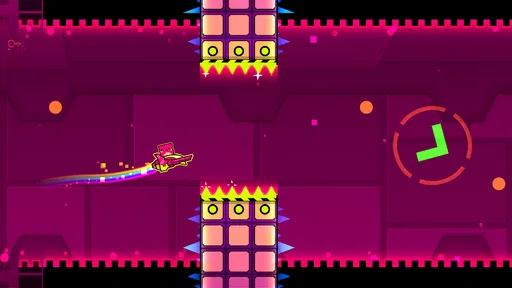
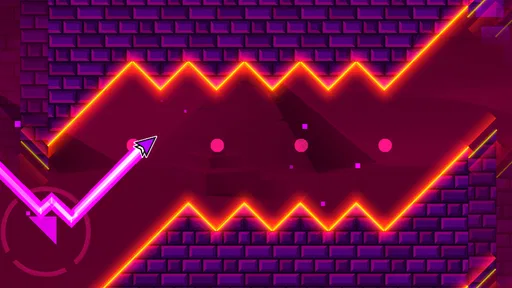
 Analysis by AppCompare
I often reach for a quick arcade game when I have a few spare minutes, but some games demand enough attention that I end up staying longer than planned. Geometry Dash SubZero is one of those: its one-touch rhythm platforming is easy to understand, while its tightly timed obstacles make every attempt feel like a small test of concentration. I find it most satisfying when I treat a run as practice rather than expecting to clear a level immediately.
How it fits into a shared day
On a shared phone or tablet, the game can work well as a casual pass-around challenge. One person can attempt a section, hand over the device, and let someone else try to get further. That makes it easy to enjoy together without needing a long session or a complicated setup. It is still a solo platforming game at heart, though, so the social part comes from taking turns and comparing progress rather than playing cooperatively in the same level.
A realistic use might be a short wait before dinner: one person makes a few attempts, then passes the device to a sibling or friend. I would agree on a simple turn-taking rule before starting, because repeated retries can make “just one more go” stretch out. If someone else needs the device, pausing the session and handing it over is more practical than expecting the game to become a group activity by itself.
Guides and Analysis on Geometry Dash SubZero
Quick to learn, demanding to master
The basic interaction is approachable: tap to jump, then learn how the timing changes as obstacles arrive. The challenge is not remembering a complicated control scheme; it is reading the visual rhythm and making a precise move at the right moment. I like that distinction because a new player can understand what to do almost immediately, even if consistent success takes patience.
There is a useful practice habit here: after a failed attempt, focus on the moment that caused it instead of tapping faster through the whole section. Was the jump early, late, or made in response to a visual cue that was easy to misread? Breaking a difficult passage into one timing question at a time makes retries feel more informative. This approach also helps when you hand the device to someone else: explain the tricky cue, not just “tap sooner.”
The trade-off is that a simple control can make failure feel abrupt. A mistimed tap can end a run, and restarting repeatedly may frustrate players who prefer gradual recovery or a forgiving checkpoint-heavy pace. If you are already tired or playing in a noisy room, the music and rapid visual changes may make it harder to concentrate. I would choose another kind of arcade game when I want a relaxed background activity rather than focused attempts.
Music, visuals, and attention
The soundtrack gives each run a strong sense of momentum, and the moving backgrounds help make the stages feel lively. I enjoy the way the visual action and beat reinforce each other, but that same energy asks for attention. This is not the sort of game I would recommend playing while trying to follow a conversation or watch something else; splitting your focus makes precise timing harder.
Worth Reading Before You Choose

Ludo King Makes the Most of the Minutes Between Plans

Baby Panda World Brings Quick Play to Modern Phones, but Its Game Library Feels Busy

ESPN’s Live Game View Makes Following Close Games Easier

Basketball Stars: Multiplayer Is Fast, but Can It Recover When Matches Go Wrong?

WEBTOON Turns Phone Updates Into a Better Reading Routine

Link to Windows Runs on Shared Habits, Not Social Feeds
For a more deliberate session, I find it helpful to watch the path as well as listen to the music. The beat can guide your sense of timing, but relying on sound alone is not a dependable shortcut when the obstacles themselves still need to be read. Conversely, staring only at the avatar can make the next sequence feel sudden. Letting the audio establish the pace while keeping your eyes on the upcoming hazards is a more balanced way to approach a run.
That combination also explains why the game may not suit every shared-device setting. If one person is trying to rest or concentrate nearby, energetic audio can become a distraction. A quieter moment is a better fit, and anyone who prefers slower, less visually busy games may find the presentation overwhelming rather than exciting.
What to expect from its arcade style
Compared with many casual arcade games that emphasize collecting items, steering freely, or surviving for as long as possible, this one puts the emphasis on a designed sequence of jumps and hazards. That gives attempts a clear rhythm and makes improvement easy to notice: you can remember where a run went wrong and try to respond differently next time. The flip side is less freedom during a level. Players who want to explore a large space at their own pace may prefer a platformer built around roaming and discovery.
RobTop Games is the developer behind this rhythm-focused arcade title. It is free to play, carries an Everyone age rating, and has reached over 100 million installs. Its average rating is 4.5 from around 949,000 ratings, with about 38,000 written reviews. Those figures suggest broad interest, but I would still judge the game by whether its retry-heavy style suits the person holding the device.
It first arrived on December 21, 2017, and the current version is 2.2.145. The listed minimum operating system is Android 5.0. For a household with an older compatible Android device, that can make it worth considering as a lightweight arcade option, though I would check that the device is actually running a supported system before installing. The details here apply to the Android release; I would not assume that another platform has identical availability or requirements.
Taking turns without muddling progress
On a device used by several people, it helps to decide whose play session it is before opening the game. A shared device does not automatically mean that each person has a separate identity or independent progress, so I would avoid assuming that one person’s attempts are isolated from another’s. If individual progress matters, agree on how the device will be shared and check the game’s current interface before relying on any account or saving behavior.
That boundary is useful even when nobody is worried about progress. A younger player may want to keep trying a level, while an adult may only have a short window to use the phone. Setting a turn length or agreeing that the device goes back to its usual owner after a few attempts can prevent a friendly challenge from becoming a dispute. The game provides the shared activity; household expectations still need to come from the people using it.
For a group, a simple “best attempt this turn” rule is often more satisfying than letting one person keep the device until they finish. It gives everyone a chance to learn the obstacle pattern and keeps the challenge moving. If a player is new, let them watch one run first, then try for themselves; observing the timing can make the first few attempts less confusing without removing the challenge.
Age, trust, and choosing the right player
The Everyone rating makes the game a reasonable candidate for a broad age range, and its basic premise is easy to explain. Still, age suitability is not the same as temperament suitability. A child who enjoys repeating a difficult section may find the challenge absorbing, while someone who becomes upset by repeated failure may be happier with a gentler game. I would watch how the player responds to retries rather than deciding from the rating alone.
For parents or caregivers, the practical question is often less “Can they understand it?” and more “Will they stop when it is time to stop?” The quick restart loop can make one more attempt feel tempting. A clear endpoint—such as finishing a short play turn or handing the device back when asked—helps keep the game in proportion, especially when it is being used between other household activities.
The community and user-created content can add reasons to stay interested, but I would treat community exploration as a separate choice from playing the core levels. If a child is using a shared device, an adult can decide whether and how they explore material beyond the main game, rather than assuming that every social or community feature is appropriate for every age. This is a general device-use boundary, not a claim that the game includes a particular family control.
Who will enjoy it—and who may not
I would recommend it to players who like learning through repetition, enjoy matching actions to a soundtrack, and take satisfaction in improving a precise run. It also works for friends or siblings who want a simple pass-the-device challenge with a clear goal. Because the controls are easy to grasp, a newcomer can join without a long explanation, while the timing gives experienced arcade players room to refine their responses.
I would steer away from it if you want a calm game to dip into while multitasking, dislike restarting after mistakes, or prefer open-ended movement over a sequence of carefully timed hazards. It is also not my first choice for a household looking for a cooperative game where everyone controls a character at once. A slower puzzle game or a more forgiving platformer would be a better match for those needs.
One small but useful way to keep it enjoyable is to alternate focused attempts with a break. After several failures, attention can become less precise even when the player feels determined to continue. Putting the device down briefly, then returning with a specific timing cue in mind, is often more productive than making a long string of frustrated taps. The game rewards patience, but that does not mean every session needs to become a test of endurance.
Jumping into the Beat
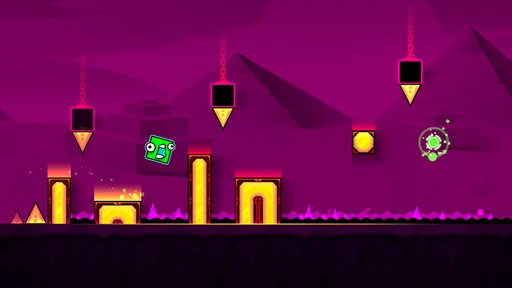
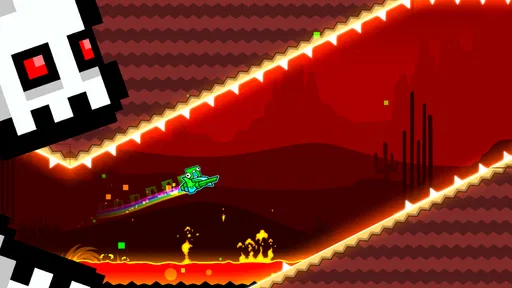
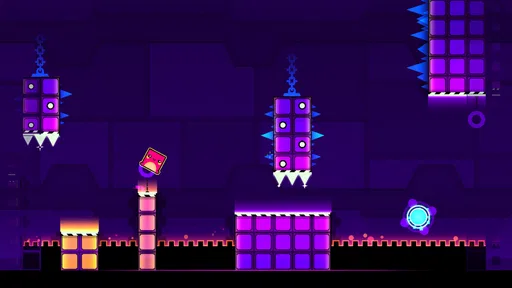
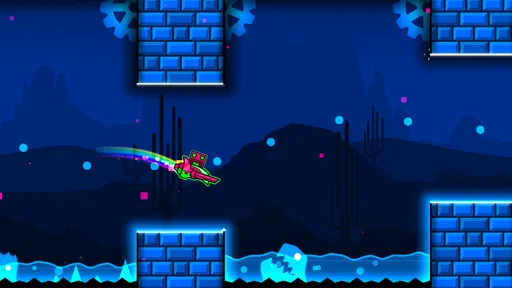
The first thing that hits you when you start the game is the insanely catchy soundtrack. The music is not just a background element; it’s the heartbeat of the game. As you navigate through the levels, each jump and dodge is perfectly synchronized with the beats, creating a seamless and immersive experience. Trust me, once you start, you’ll find yourself bobbing your head along as your little geometric avatar leaps through spikes and obstacles.
Visuals That Pop
Visually, this game is a treat. The graphics are bright, bold, and full of energy. The neon colors and dynamic backgrounds keep you on your toes and add to the overall excitement. It’s like your eyes are having a party, and who doesn’t love a good party?
What’s also cool is how the visuals and music work together. You’ll notice that the backgrounds change and adapt to the beat, creating a synchronized spectacle that’s both challenging and entertaining.
Controls and Gameplay
Now, let’s talk about the controls. They’re simple and intuitive. You tap to jump, and that’s about it. But don’t let this simplicity fool you. The real challenge lies in the timing and precision. Missing a beat or a jump could mean starting from scratch, and believe me, you’ll be doing that quite a bit! But that’s part of the fun, right?
The levels are well-designed, providing just the right amount of challenge to keep you coming back for more. Each level is unique, with its own set of traps and surprises that keep you guessing and engaged. Whether you’re a seasoned pro or a newbie, there’s something here for everyone.
Replayability and Community
One of the things I love about this game is its replayability. Each level has multiple secrets and alternative paths, encouraging you to play again and again. Plus, the vibrant community surrounding the game is full of tips, tricks, and user-created content to explore.
There’s a sense of accomplishment that comes with mastering a level, and sharing your progress with the community adds a social element that’s both rewarding and motivating.
My household verdict
As an arcade game for short, focused turns, this is an easy one to recommend to the right player. I like its immediate controls, strong audio-visual identity, and the way each retry gives me a concrete timing lesson to apply. It can suit a shared household device when people take turns willingly and understand that the challenge is about improving a run, not passing through a story together.
My reservations are just as practical: repeated failure can wear on impatient players, the busy presentation needs attention, and a household should set its own boundaries around turns and community exploration. If those conditions sound manageable, Geometry Dash SubZero is a lively free arcade choice for anyone who enjoys rhythm-led precision. If what you really want is relaxed exploration or cooperative play, I would pick a different game instead.
Pros
- Engaging and challenging gameplay.
- Vibrant and dynamic graphics.
- Catchy and energetic soundtrack.
- Simple one-touch controls.
- Frequent updates with new levels.
Cons
- Limited level variety.
- In-app ads can be intrusive.
- High difficulty may frustrate some.
- No multiplayer feature.
- Requires precise timing skills.
FAQs for Geometry Dash SubZero
What is Geometry Dash SubZero and how does it differ from the original Geometry Dash?
Geometry Dash SubZero is a standalone expansion of the popular Geometry Dash series. It offers new levels, music, and challenges exclusive to this version. Unlike the original, SubZero is free to play and features three brand-new levels with unique soundtracks. It's a great introduction to the Geometry Dash universe for newcomers.
Is Geometry Dash SubZero free to play?
Yes, Geometry Dash SubZero is completely free to download and play. Unlike some other versions of Geometry Dash, SubZero does not require any upfront payment. However, it may include optional in-app purchases for players looking to enhance their experience or support the developers further.
What are the system requirements for installing Geometry Dash SubZero on my device?
To install Geometry Dash SubZero, you'll need a device running on Android 4.0 or later, or iOS 8.0 or later. It requires minimal storage space, making it accessible for most smartphones and tablets. Ensure you have a stable internet connection for the initial download to avoid any interruptions.
Are there any in-app purchases or ads in Geometry Dash SubZero?
While Geometry Dash SubZero is free to play, it includes ads that may appear during gameplay. These ads help support the developers. Additionally, there are in-app purchases available, usually to remove ads or unlock additional features, although these are entirely optional and not necessary to enjoy the game.
Can I play Geometry Dash SubZero offline?
Yes, once you've downloaded Geometry Dash SubZero, you can enjoy the game offline. This makes it perfect for playing on the go, whether you're commuting or in an area with limited internet access. However, features like in-app purchases and ads would require an internet connection.


